In today's digital-first world, businesses are constantly searching for innovative ways to connect with customers, streamline operations, and improve marketing performance. One technology that continues to grow in popularity across industries is the QR code.
QR codes have evolved far beyond simple website links. Modern businesses use them for product packaging, digital menus, customer feedback collection, event registrations, payments, marketing campaigns, business cards, and much more.
The growing adoption of smartphones has made QR codes one of the easiest and most effective tools for bridging the gap between offline and online experiences. A customer can simply scan a code and instantly access information, promotions, contact details, documents, videos, or websites.
This is where a reliable QR code generator becomes essential.
Businesses need a solution that is easy to use, fast, secure, and accessible without expensive software. PrimeNotepad offers a practical way to generate QR codes for various business needs while maintaining a simple user experience.
This guide explores everything businesses need to know about QR codes, their benefits, practical use cases, and how to choose the best free QR code generator.
What Is a QR Code?
A QR code, short for Quick Response code, is a two-dimensional barcode that stores information in a machine-readable format.
Unlike traditional barcodes that contain limited information, QR codes can store:
- • Website URLs
- • Contact details
- • Email addresses
- • Phone numbers
- • Text information
- • PDF links
- • Social media profiles
- • Wi-Fi credentials
- • Product information
When scanned using a smartphone camera or QR code scanner, the encoded information becomes instantly accessible.
Because QR codes are versatile and easy to implement, businesses of all sizes use them to improve customer engagement and simplify communication.
Why Businesses Use QR Codes
Businesses are constantly looking for efficient methods to share information and encourage customer interaction.
QR codes help achieve these goals by reducing friction.
Instead of asking customers to:
- • Type long URLs
- • Search for websites manually
- • Enter contact details
- • Download resources through multiple steps
A simple scan completes the process.
Key Advantages
Faster Customer Access
Customers can instantly access information without typing anything.
Improved User Experience
QR codes eliminate unnecessary steps and simplify interactions.
Increased Engagement
Interactive experiences often result in higher engagement rates.
Cost-Effective Marketing
Businesses can use QR codes on printed materials without ongoing printing costs.
Easy Tracking
Many QR campaigns allow businesses to measure engagement and campaign effectiveness.
Common Business Uses for QR Codes
1. Business Cards
Traditional business cards are limited by available space.
QR codes allow businesses to include:
- • Contact information
- • Company website
- • Portfolio links
- • Social profiles
- • Appointment booking pages
This creates a more interactive networking experience.
2. Product Packaging
Many brands now place QR codes directly on product packaging.
Customers can scan the code to access:
- • Product instructions
- • User manuals
- • Warranty registration
- • Tutorials
- • Product authenticity verification
This improves customer satisfaction while reducing printed material costs.
3. Restaurant Menus
Restaurants increasingly use QR codes for digital menus.
Benefits include:
- • Easy menu updates
- • Reduced printing expenses
- • Faster customer access
- • Improved hygiene
Digital menus have become standard in many regions worldwide.
4. Event Management
Event organizers use QR codes for:
- • Ticket verification
- • Registration forms
- • Event schedules
- • Speaker information
- • Feedback collection
The result is a smoother event experience for attendees.
5. Customer Reviews
Businesses can encourage reviews by linking QR codes directly to review platforms.
This reduces the effort required from customers and often increases review volume.
6. Marketing Campaigns
Marketing teams use QR codes in:
- • Flyers
- • Brochures
- • Posters
- • Product packaging
- • Billboards
- • Print advertisements
Each scan provides an opportunity to engage customers digitally.
How QR Codes Improve Marketing Performance
Marketing success depends heavily on removing barriers between businesses and customers.
QR codes accomplish this by simplifying interactions.
Improved Conversion Rates
When customers encounter fewer obstacles, conversion rates often improve.
For example:
Instead of typing a complicated URL from a flyer, users simply scan a QR code and arrive directly at the intended landing page.
Enhanced Offline-to-Online Integration
Traditional marketing materials become more powerful when connected to digital content.
Examples include:
- • Magazine advertisements linking to product pages
- • Product packaging linking to tutorials
- • Business cards linking to contact forms
Better Audience Insights
Businesses can analyze scan activity to better understand customer behavior and campaign performance.
These insights help improve future marketing strategies.
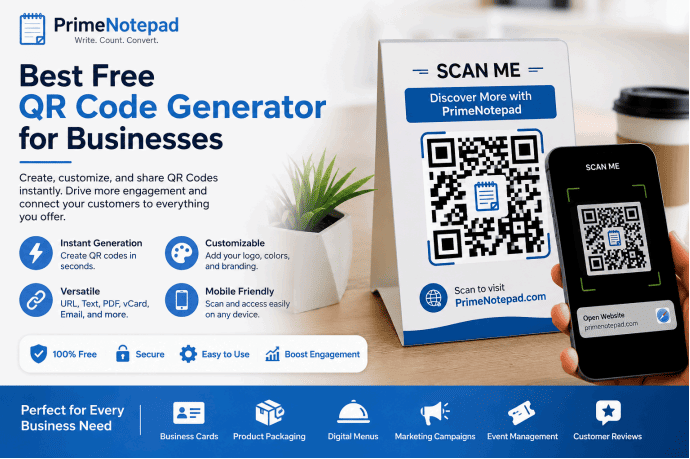
Features to Look for in a Free QR Code Generator
Not all QR code generators provide the same level of functionality.
Businesses should evaluate several important features before choosing a platform.
Ease of Use
The best tools require minimal technical knowledge.
Users should be able to generate codes within minutes.
Fast Generation
Time-saving tools improve productivity.
Businesses should not have to navigate complicated processes just to create a QR code.
Mobile Compatibility
Generated QR codes should function properly across devices and platforms.
Reliable Output Quality
Low-quality QR codes can result in scanning failures.
High-resolution output is important for professional use.
Security
Businesses should avoid generators that introduce suspicious redirects or security concerns.
Flexibility
Useful QR generators support various content types such as:
- • URLs
- • Contact details
- • Text
- • Documents
- • Social media links
Why Businesses Prefer Free QR Code Solutions
Small businesses and startups often operate with limited budgets.
A free QR code generator provides several advantages:
Lower Costs
No need to purchase expensive software subscriptions.
Quick Deployment
Teams can begin using QR codes immediately.
Accessibility
Employees across departments can generate codes without specialized training.
Scalability
Businesses can create QR codes for multiple campaigns without additional costs.
For many organizations, free QR solutions provide everything needed to launch effective campaigns.
PrimeNotepad QR Code Generator for Business Use
PrimeNotepad provides businesses with a practical solution for generating QR codes quickly and efficiently.
The platform is designed for users who want a straightforward experience without unnecessary complexity.
Benefits include:
- • User-friendly interface
- • Fast QR code generation
- • Accessibility across devices
- • Business-friendly workflow
- • Easy implementation
Whether creating QR codes for marketing materials, digital business cards, educational resources, product packaging, or customer engagement campaigns, businesses can benefit from a streamlined process that saves time and improves efficiency.
Real-World Examples of Successful QR Code Usage
Retail Industry
Retail stores often place QR codes on product displays.
Customers can scan to:
- • Learn product details
- • Watch demonstrations
- • Compare specifications
- • Access discounts
This creates a more informed purchasing experience.
Education Sector
Schools and educational institutions use QR codes for:
- • Course materials
- • Assignment instructions
- • Attendance systems
- • Learning resources
This improves accessibility and reduces administrative workload.
Healthcare Providers
Healthcare organizations utilize QR codes for:
- • Patient forms
- • Appointment scheduling
- • Educational resources
- • Service information
The result is greater convenience for both providers and patients.
Real Estate
Property listings increasingly include QR codes that link to:
- • Virtual tours
- • Property details
- • Agent contact information
- • Mortgage resources
This allows buyers to access information instantly.
Static vs Dynamic QR Codes
One of the most important decisions businesses face when creating QR codes is choosing between static and dynamic QR codes.
| Feature |
Static QR Codes |
Dynamic QR Codes |
| Definition |
Contain fixed information that cannot be changed after creation. |
Allow the destination or content to be updated without changing the QR code itself. |
| Examples |
Website URLs, Contact Details, Email Addresses, Plain Text |
Landing Pages, Promotional Offers, Event Information, Product Details |
| Editability |
❌ Cannot be edited after creation |
✅ Content can be updated anytime |
| Ease of Creation |
✅ Very easy to create |
✅ Easy to create but may require a specialized platform |
| Cost |
✅ Usually free with no ongoing costs |
⚠️ May involve subscription or service fees |
| Flexibility |
❌ Limited flexibility |
✅ Highly flexible for changing campaigns |
| Tracking & Analytics |
❌ No advanced tracking capabilities |
✅ Performance tracking and scan analytics available |
| Marketing Optimization |
❌ Limited optimization options |
✅ Supports campaign optimization and testing |
| Best For |
Permanent information that rarely changes |
Marketing campaigns, promotions, and frequently updated content |
| Maintenance |
✅ No maintenance required after creation |
⚠️ Requires management of destination content |
| Business Use Cases |
Business cards, Wi-Fi access, permanent website links, contact information |
Advertising campaigns, product promotions, event registrations, seasonal offers |
| Long-Term Value |
Good for static information |
Better for businesses that frequently update content |
| Main Advantage |
Simple, free, and permanent |
Editable, trackable, and highly flexible |
| Main Limitation |
Cannot be modified once created |
May require paid services and ongoing management |
QR Code Design Best Practices
Creating a QR code is simple, but creating an effective QR code requires careful planning.
Use High Contrast
QR codes should have clear contrast between the foreground and background.
Best practice:
- • Dark code
- • Light background
Poor contrast can reduce scan reliability.
Maintain Adequate Size
A QR code that is too small may be difficult to scan.
Businesses should ensure the code remains readable across:
- • Flyers
- • Packaging
- • Posters
- • Business cards
- • Product labels
Avoid Excessive Customization
While branding is important, excessive design changes may affect functionality.
Always test customized QR codes before publishing.
Add a Call-to-Action
Customers are more likely to scan when they understand the benefit.
Examples include:
- • Scan to View Menu
- • Scan for Discount
- • Scan to Learn More
- • Scan for Product Details
- • Scan to Download Guide
Clear instructions often increase scan rates.
Test Before Distribution
Every QR code should be tested on:
- • Android devices
- • iPhones
- • Tablets
- • Multiple scanning apps
Testing helps prevent campaign failures.
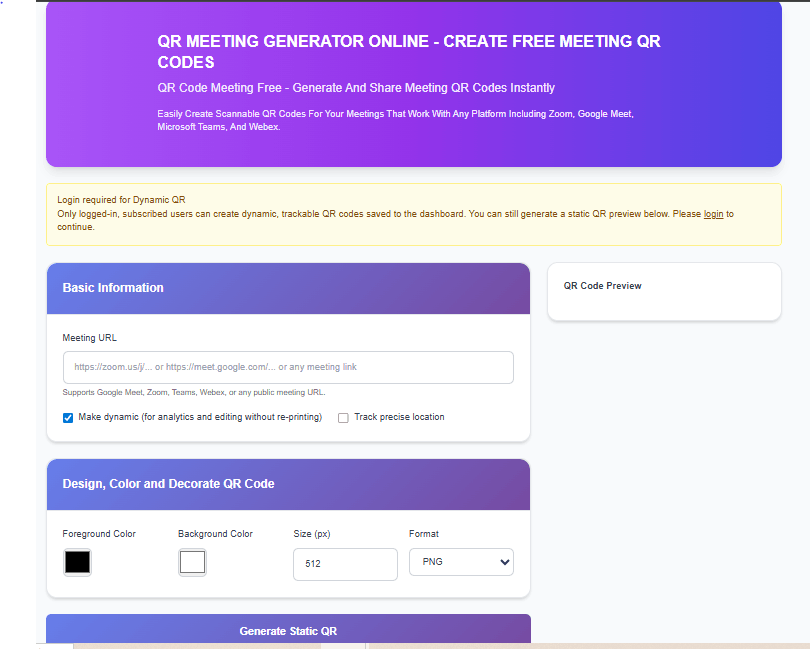
Common QR Code Mistakes Businesses Should Avoid
Linking to Non-Mobile-Friendly Pages
Most QR code scans occur on mobile devices.
If the landing page is not mobile-friendly, users may leave immediately.
Using Long or Confusing Landing Pages
The destination page should be:
- • Relevant
- • Fast loading
- • Easy to navigate
- • Focused on user intent
Ignoring Analytics
Businesses that fail to measure QR code performance miss valuable insights.
Tracking helps identify:
- • Campaign effectiveness
- • User engagement
- • Geographic trends
- • Marketing opportunities
Poor Placement
Even a perfect QR code may fail if customers cannot easily find it.
Placement should be:
- • Visible
- • Accessible
- • Contextually relevant
Lack of Clear Purpose
Every QR code should have a defined objective.
Examples include:
- • Lead generation
- • Product education
- • Review collection
- • Sales conversion
- • Customer support
Without a purpose, results may be disappointing.
Future of QR Codes in Business
The future of QR codes looks promising as businesses continue embracing digital transformation.
Several trends are driving adoption:
Contactless Experiences
Consumers increasingly prefer touch-free interactions.
QR codes support:
- • Contactless payments
- • Digital menus
- • Online ordering
- • Self-service information
Omnichannel Marketing
Businesses are combining offline and online marketing channels.
QR codes help connect:
- • Print advertising
- • Product packaging
- • Social media campaigns
- • E-commerce platforms
Improved Customer Engagement
Interactive experiences encourage stronger customer relationships.
Businesses can use QR codes to deliver:
- • Videos
- • Tutorials
- • Promotions
- • Loyalty programs
- • Personalized content
Growth in Mobile Commerce
As mobile shopping continues growing, QR codes provide convenient pathways to products and services.
Many businesses now include QR codes throughout the customer journey.
How Small Businesses Can Benefit Most
Small businesses often face challenges related to:
- • Limited budgets
- • Small teams
- • Marketing constraints
QR codes provide a practical solution because they are:
- • Affordable
- • Flexible
- • Easy to implement
- • Scalable
A local business can use QR codes for:
- • Store promotions
- • Product information
- • Customer reviews
- • Loyalty programs
- • Appointment bookings
without major investment.
Conclusion
QR codes have become one of the most effective tools for modern businesses seeking to improve customer engagement, simplify communication, and enhance marketing performance. Their versatility allows organizations of all sizes to connect physical and digital experiences while reducing friction for customers.
Whether used on business cards, product packaging, restaurant menus, advertisements, event materials, or promotional campaigns, QR codes provide a convenient way to deliver information instantly.
For businesses looking for a simple and efficient solution, PrimeNotepad offers an accessible way to create QR codes for various professional and marketing purposes. By combining thoughtful QR code strategies with clear business objectives, organizations can improve customer experiences, strengthen brand interactions, and support long-term growth.
As mobile technology continues evolving, QR codes are likely to remain an essential component of modern business communication and digital marketing strategies.
Frequently Asked Questions
1. What is the best use of a QR code for businesses?
Businesses commonly use QR codes for marketing, product information, customer engagement, reviews, and digital business cards.
2. Are QR codes free to create?
Many online QR code generators allow users to create QR codes at no cost.
3. Can QR codes increase sales?
When used effectively, QR codes can improve customer engagement and simplify purchasing journeys, potentially increasing conversions.
4. Do QR codes expire?
Static QR codes generally do not expire. Dynamic QR codes may depend on the provider's service terms.
5. Can I place QR codes on product packaging?
Yes. Product packaging is one of the most popular uses of QR codes.
6. Are QR codes safe?
QR codes themselves are safe, but users should ensure the destination links come from trusted sources.
7. Do QR codes work on all smartphones?
Most modern smartphones include built-in QR scanning functionality through their camera applications.
8. How large should a QR code be?
The ideal size depends on viewing distance, but larger and clearly visible codes generally perform better.
9. Can QR codes be used offline?
Yes. QR codes can appear on printed materials such as brochures, posters, packaging, and business cards.
10. Why are QR codes popular in marketing?
They provide a quick and convenient way to connect offline audiences with digital content.