In today's fast-moving digital world, exchanging contact details should be instant, simple, and professional. Networking has gone digital, and traditional paper cards are no longer enough to make a lasting impression. Professionals and businesses now prefer digital business cards QR code solutions that are faster, smarter, and easier to share. With PrimeNotepad, you can create a professional QR-based digital business card online for free—no design skills or technical knowledge required.
What Is a QR Digital Business Card Online?
A QR digital business card online is a modern contact sharing tool that uses a QR code to store and display your professional details. When someone scans the QR code using their smartphone camera, your contact information opens instantly on their screen.
Unlike paper cards, QR digital business cards are always accessible, easy to update, and can include multiple links such as phone numbers, email addresses, websites, and social profiles.
What Information Should Your QR Digital Business Card Include?
Before creating your QR code, gather the essential details you want to share. A good digital business card should include:
- • Full name
- • Job title or profession
- • Phone number
- • Email address
- • Website or portfolio link
- • Social media profiles (LinkedIn, Instagram, etc.)
- • WhatsApp or contact action link
Keeping the information concise ensures a better experience for anyone who scans your QR code.
How to Create a QR Code Digital Business Card for Free Using PrimeNotepad?
Follow these simple steps to create your digital business card using PrimeNotepad and a QR business card generator free.
Step 1. Go to the Digital Business Cards Page
Navigate to the Digital Business Cards – QR Code section on PrimeNotepad. This page houses the built-in interface where you’ll create your contact profile.
Step 2. Enter Your Contact Details
Fill in your personal and professional details, including:
- • Full name
- • Job title or profession
- • Company or organization
- • Phone number
- • Email address
- • Website or portfolio
- • A short “About” or bio
PrimeNotepad's form lets you structure your contact profile clearly, so when someone scans your QR code, they get all the relevant details at a glance.
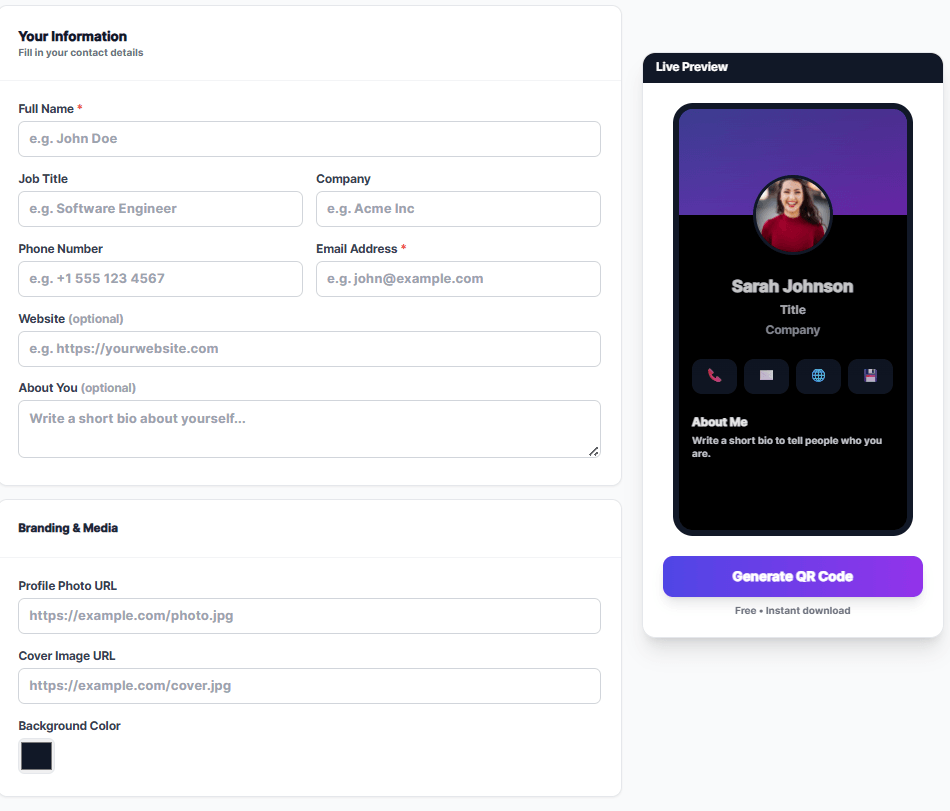
Step 3. Customize Your Look and Layout
Choose from available templates and layout options to match your brand image. You can tweak colors, add a profile photo, and adjust how your card appears. This helps make your digital interactions feel more professional and personal.
Step 4. Generate Your QR Code
Once everything is filled out and styled the way you like, click Generate QR Code. PrimeNotepad will create a scannable QR image linked to your unique card page — ready for download or direct sharing.
Step 5. Save and Share Your QR Code
After generating your digital business card QR code, you can download it and share it in many ways:
- • Add it to your email signature
- • Share it on social media channels
- • Print it on business materials
- • Include it in presentations or portfolios
Your connections can then scan your QR and instantly access your contact details without typing anything.
Why Use PrimeNotepad to Create a QR Digital Business Card?
PrimeNotepad is known for its simplicity, privacy-focused design, and ease of use. It allows users to create clean, well-organized digital content without unnecessary complexity.
When paired with a QR business card generator, PrimeNotepad becomes a powerful tool for creating and managing digital business cards.
Using PrimeNotepad helps you:
- • Organize contact details clearly
- • Edit information anytime
- • Share links easily
- • Maintain a professional digital presence
This makes PrimeNotepad an ideal choice for creating a QR-based digital business card without spending money.
Best Practices for an Effective QR Digital Business Card Online
To make your QR digital business card online more effective, follow these tips:
- • Use a clear call-to-action like “Scan to Save Contact”
- • Ensure high contrast between the QR code and background
- • Avoid overcrowding with too much information
- • Keep details updated regularly
- • Test the QR code periodically
These small optimizations can significantly improve user experience and engagement.
Where You Can Use Your QR Code Digital Business Card?
Your QR digital business card can be shared across multiple platforms:
- • Business meetings and conferences
- • Email signatures
- • LinkedIn and social media bios
- • Websites and landing pages
- • Flyers, posters, or presentations
This flexibility makes QR business cards more powerful than traditional paper cards.
Digital Business Cards vs Traditional Paper Cards
Traditional business cards have several limitations. They can be lost, damaged, or forgotten, and updating details requires reprinting. In contrast, digital business cards powered by QR codes are always accessible and easy to maintain.
Using PrimeNotepad along with a QR code business card generator allows you to stay flexible, professional, and future-ready without recurring costs.
Frequently Asked Questions
1. What is a QR Business Card Generator?
A QR Business Card Generator is a tool that creates a scannable QR code containing your contact details, website, social media links, or digital business card. Users can scan the code with a smartphone to instantly save your information.
2. Can I create a QR business card for free?
Yes, many platforms allow users to generate free QR business cards without signup or hidden charges. Free tools usually support static QR codes, while advanced analytics and editable QR codes may require premium plans.
3. Do free QR business cards expire?
Static QR codes generally do not expire because the data is directly stored inside the QR code itself. However, some dynamic QR code services may disable codes after trial periods, so always check the platform details before printing.
4. What information can I add to a QR business card?
You can include your name, phone number, email address, company name, website URL, social media profiles, portfolio links, and even WiFi or payment details depending on the generator features.
5. Can I customize the design of my QR code?
Yes, most modern QR business card generators allow customization such as logo upload, colors, gradients, frames, shapes, and branding styles while maintaining scan quality.
6. Why should I use a QR code on my business card?
QR codes make networking faster and more professional by allowing people to instantly save your contact information without typing. They also help connect users to websites, portfolios, LinkedIn profiles, or digital business cards in one scan.
Conclusion
Creating a professional digital business card no longer requires expensive tools or technical skills. With PrimeNotepad, you can easily organize your contact information and pair it with a reliable QR business card generator to share your details instantly.
As networking continues to evolve, digital business cards QR code solutions are becoming the preferred choice for modern professionals. By using a QR digital business card online, you can improve accessibility, reduce costs, and present yourself in a smart, eco-friendly way.
Start creating your free QR code digital business card today with PrimeNotepad and take your networking experience to the next level.