How QR Code Scanner Works on PrimeNotepad
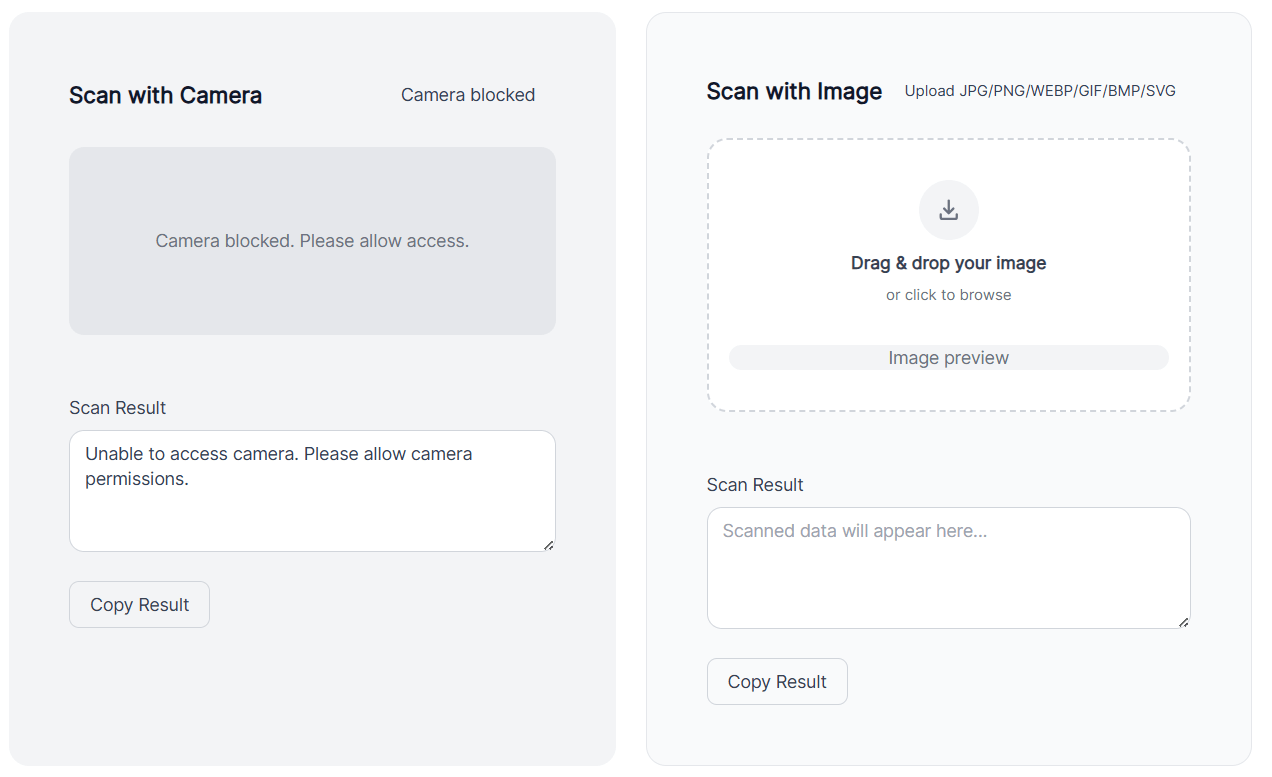
The QR code scanner on this page is a browser-based scanning tool, meaning it works directly inside your web browser without requiring any app download.
1. Camera or Image Input
The scanner gives users two main ways to scan:
- Using device camera (mobile or desktop webcam)
- Uploading an image containing a QR code
This flexibility allows scanning from both real-world objects and saved screenshots.
The platform itself confirms it supports scanning "with camera or image"
2. Real-Time QR Detection
When the camera is activated:
- The tool continuously captures frames from the camera
- It scans each frame for QR code patterns (square markers and alignment blocks)
- Once detected, it isolates the QR code area
This happens instantly using JavaScript-based decoding libraries running in the browser.
3. Decoding the QR Code
After detecting the QR code:
- The system reads the encoded data inside the square matrix
- It converts it into readable output such as:
- Website URL
- Text
- Contact details
- WiFi credentials
This decoding process is extremely fast and usually takes less than a second.
4. Displaying the Result
Once decoded, the scanner:
- Shows the extracted content on the screen
- If it's a URL → provides a clickable link
- If it's text → displays it instantly
This allows users to interact immediately without extra steps.
5. No Installation Required
One of the biggest advantages of this tool:
- Works entirely online in the browser
- No app download needed
- Compatible with:
- Mobile devices
- Laptops
- Tablets
This makes it a QR Code Scanner Online solution, ideal for quick access.
6. Webcam-Based Scanning (Desktop Use)
On desktops or laptops:
- The tool uses your webcam
- You allow browser permission
- The scanner reads QR codes in real time from your camera feed
This is essentially a Web Cam QR Code Scanner, useful for:
- Remote work
- Online meetings
- Scanning codes from another screen
7. Privacy & Security
Since the scanner runs in your browser:
- No data needs to be uploaded to external servers (in most cases)
- Faster processing
- Better privacy control
However, users should still be cautious:
- Only open links from trusted QR codes
8. Integration with QR Ecosystem
The scanner is part of a broader system on the site that includes:
- QR code generation
- Dynamic QR codes with analytics
- Custom QR designs
These features allow users to both create and Scan QR Code in one place.
Simple Workflow Summary
- Open the scanner page
- Allow camera or upload image
- QR code detected automatically
- Data decoded instantly
- Result displayed for action
Why This Scanner is Useful
- No installation required
- Works across devices
- Supports image + live scan
- Fast and user-friendly
- Integrated with QR creation tools
Top Use Cases of QR Codes in 2026
QR codes are no longer limited to menus and payments. Their versatility has expanded across multiple sectors:
- Contactless Payments: Users can simply Scan QR Code to make instant, cashless transactions.
- Smart Packaging: QR codes provide product details, tutorials, and sustainability info.
- Event Ticketing: Digital QR tickets enable fast, secure, and fraud-free entry.
- Education: Links to interactive content make learning more engaging.
- Healthcare: Used for patient records, prescriptions, and secure data access.
- AR Experiences: Enhances engagement with immersive and interactive brand content.
High-Converting Marketing Strategies Using QR Codes
Businesses in 2026 are leveraging QR codes not just for functionality, but as powerful marketing assets. Here's how:
1. Personalized Customer Journeys: Dynamic QR codes allow marketers to tailor content based on user behavior, location, or time. This personalization significantly boosts engagement and conversion rates.
2. Seamless Omnichannel Integration: QR codes connect offline materials—like flyers, billboards, and packaging—to digital platforms. This creates a unified customer journey across multiple touchpoints.
3. Data Tracking & Analytics: Modern QR campaigns provide detailed insights, including scan location, device type, and time of interaction. These analytics help businesses refine strategies and improve ROI.
4. Instant Access to Offers: Limited-time promotions delivered through QR codes encourage immediate action. For example, scanning a code in-store might unlock a discount or exclusive content.
5. Social Media Growth: Brands use QR codes to drive traffic to social media profiles, increasing followers and engagement without requiring users to search manually.
6. Contactless Lead Generation: At events and trade shows, QR codes replace traditional forms. Attendees can scan and instantly share their information, streamlining lead capture.
Best Practices for QR Code Optimization
To maximize effectiveness, businesses should follow these best practices:
- Keep it simple: Ensure the landing page loads quickly and is mobile-friendly.
- Use clear CTAs: Tell users exactly what they'll get by scanning.
- Test before launch: Verify functionality across multiple devices and environments.
- Prioritize design: Customize QR codes with brand colors while maintaining scannability.
- Ensure security: Use trusted platforms and HTTPS links to build user trust.
The Future of QR Codes
As technology continues to evolve, QR codes are expected to integrate even more deeply with AI, IoT, and blockchain systems. They will likely play a key role in identity verification, smart cities, and automated retail experiences.
The simplicity of scanning combined with powerful backend capabilities makes QR codes one of the most effective tools for bridging physical and digital worlds. Whether you're a business owner, marketer, or everyday user, understanding how to leverage this technology can unlock new opportunities in 2026 and beyond.
Conclusion
QR codes in 2026 are more than just a scanning tool—they're a bridge between the physical and digital worlds.
Whether you're a business owner, marketer, or everyday user:
- Understanding how QR scanners work helps you use them effectively
- Leveraging use cases opens new opportunities
- Applying marketing strategies turns scans into conversions
FAQ
1. What is a QR code and how does it work?
A QR code is a two-dimensional barcode that stores information such as URLs, text, or payment data. When scanned using a device camera or scanning tool, it decodes the data and directs users to the intended content instantly.
2. Do I need an app to scan QR codes in 2026?
No, most modern smartphones have built-in QR scanning features. You can also use browser-based tools for quick and easy access without installing additional apps.
3. Are QR codes safe to use?
Yes, QR codes are generally safe. However, users should only scan codes from trusted sources, as malicious links can sometimes be embedded. Many modern scanners now include security checks.
4. What are the most common uses of QR codes today?
QR codes are widely used for payments, digital menus, event ticketing, product information, marketing campaigns, and contactless interactions.
5. How can businesses use QR codes for marketing?
Businesses can use QR codes to drive traffic to websites, offer discounts, collect customer data, promote social media, and create personalized customer experiences.
6. Can QR codes be customized for branding?
Yes, QR codes can be customized with colors, logos, and design elements while still remaining scannable, helping businesses maintain brand identity.
7. Do QR codes expire?
Static QR codes do not expire, but dynamic QR codes can be edited or deactivated depending on the platform used to generate them.