Creating handwritten assignments, notes, and projects no longer requires spending hours writing everything by hand. With a Text to Handwriting Converter, you can transform typed text into realistic handwritten pages within minutes.
Whether you're a student preparing assignments, a teacher creating handwritten worksheets, or someone looking for personalized handwritten notes, a handwriting generator can save time while producing neat and readable documents.
If you're looking for a simple solution, try the PrimeNotepad Text to Handwriting Tool:
What Is a Text to Handwriting Converter?
A Text to Handwriting Converter is an online tool that converts typed text into handwriting that looks like it was written on paper. Instead of writing every word manually, you simply paste your content, customize the appearance, and download the handwritten version.
Modern handwriting generators allow you to customize:
- • Handwriting fonts
- • Ink color
- • Font size
- • Line spacing
- • Paper style
- • Margins
- • Page size
The result is a clean, professional-looking handwritten document.
Why Use a Free Handwriting Generator?
Thousands of students and professionals use handwriting tools because they offer several advantages.
Save Time
Writing long assignments by hand can take hours. A handwriting generator completes the same work in minutes.
Create Neat Notes
Messy handwriting can make assignments difficult to read. Generated handwriting remains neat and consistent throughout every page.
Perfect for School Projects
Students can prepare handwritten project work, practical files, homework, and notes without repeatedly rewriting pages.
No Software Required
Everything works directly inside your browser. There's no installation or complicated setup.
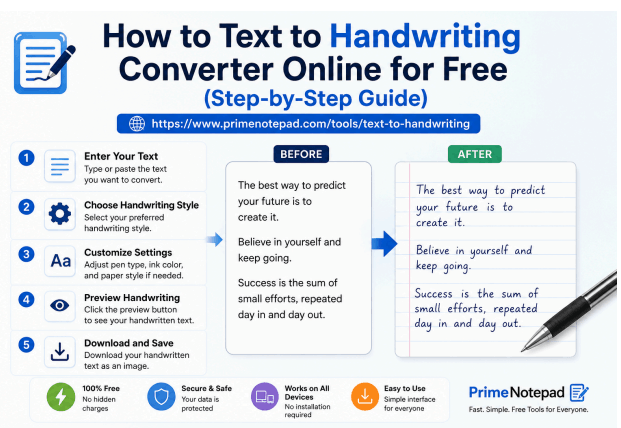
How to Convert Text to Handwriting Online (Step-by-Step)
Creating handwritten pages is easy.
Step 1: Open the Tool
Visit the PrimeNotepad Text to Handwriting Converter.
Step 2: Paste Your Text
Copy your assignment, notes, or article and paste it into the editor.
Step 3: Customize the Handwriting
Choose your preferred:
- • Handwriting style
- • Font size
- • Ink color
- • Paper background
- • Page layout
Adjust the settings until the preview matches your preference.
Step 4: Preview the Result
Review the handwritten page before downloading. Make any formatting changes if necessary.
Step 5: Download
Export your handwritten document and print or share it digitally.
How Students Can Create Handwritten Assignments Online
Students often spend several hours writing assignments manually.
Instead, they can follow this simple workflow:
Write the Assignment
Prepare the content using any text editor.
Copy the Text
Copy the completed assignment.
Paste into the Handwriting Generator
Paste everything into the converter.
Customize the Appearance
Select a handwriting font and paper style.
Download the Assignment
Save the handwritten version and print it if required.
This process is especially useful for:
- • Homework
- • College assignments
- • Lab records
- • School projects
- • Practical files
- • Study notes
- • Revision notebooks
Features to Look for in a Handwriting Generator
A good handwriting converter should include:
- • Multiple handwriting styles
- • Realistic handwritten output
- • Adjustable font size
- • Different ink colors
- • Notebook paper backgrounds
- • PDF or image download
- • Mobile compatibility
- • Fast processing
- • No software installation
- • Free access
Benefits of Using PrimeNotepad's Text to Handwriting Tool
PrimeNotepad makes handwritten document creation simple and fast.
Some of its advantages include:
- • Free to use
- • Works online
- • No installation required
- • User-friendly interface
- • Fast handwriting generation
- • Suitable for students and professionals
- • Clean and readable handwritten output
- • Accessible from desktop and mobile browsers
Tips for Creating Realistic Handwritten Notes
To make your handwritten pages look more natural:
- • Use moderate font sizes.
- • Keep proper line spacing.
- • Choose a handwriting style that matches your preference.
- • Avoid overcrowding the page.
- • Review the preview before downloading.
- • Use appropriate margins for printing.
Final Thoughts
A Text to Handwriting Converter is one of the easiest ways to turn typed content into clean, realistic handwritten pages. Whether you're preparing assignments, study notes, or projectswork, an online handwriting generator can save time while producing professional-looking results.
If you're looking for a fast, free, and easy-to-use solution, try the PrimeNotepad Text to Handwriting Tool today. Simply paste your text, customize the handwriting, and generate handwritten pages in just a few clicks.
Frequently Asked Questions
Is a text to handwriting converter free?
Yes. Many online handwriting generators, including PrimeNotepad's tool, allow you to convert text into handwriting without installing software.
Can I use it for school assignments?
Yes. Students commonly use handwriting generators for assignments, notes, projects, and study materials.
Does it work on mobile devices?
Yes. Since the tool runs in your browser, it works on desktops, tablets, and smartphones.
Can I customize the handwriting?
Yes. You can typically adjust font style, font size, spacing, paper type, and ink color to suit your needs.
Do I need to install any software?
No. Everything works online, so there is nothing to download or install.